Offline-first point of sale
The till that never stops selling.
Turn a phone or tablet into a till that keeps working when the internet does not, with a back office that runs the whole business.

- No credit card
- GST and VAT invoices
Animation: a status pill flips between Online and Offline. While Offline, new lines keep landing in the till and an unsent counter rises. When Online returns, the unsent records fly to the cloud and the back office total ticks up.
-
0
days free
-
0
back-office languages
-
0
reports on the till
Solutions
Which shop are you?
Pick the shape of your business and jump to the chapters that matter to you.
Café or restaurant
Market stall or kiosk
Multi-location chain
Product tour
One sale, start to finish.
Follow a single sale from opening the day to reading the Z-Report. Every step works without a connection except the first sign-in.
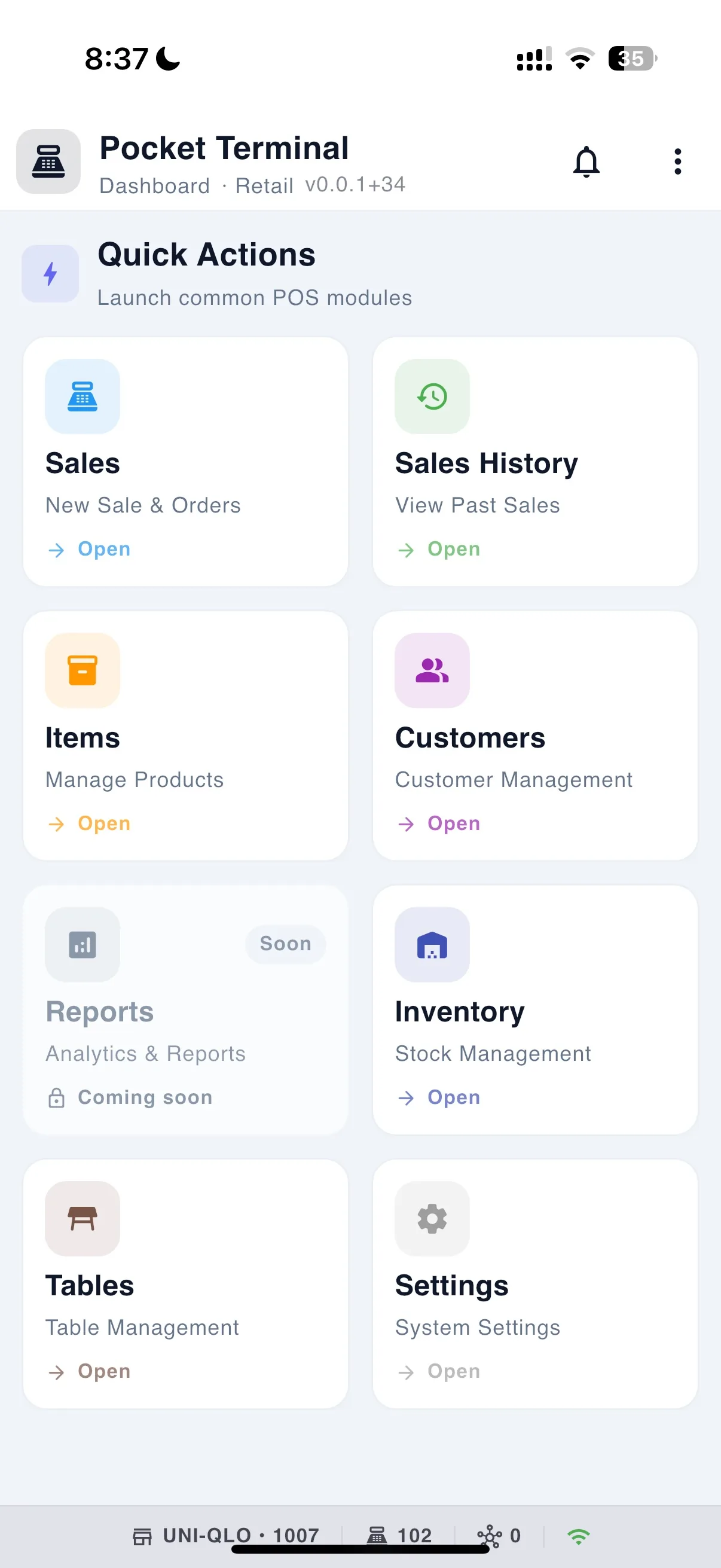
Till home screen with today's overview and quick actions
The product
Every part of the business, shown not listed.
Eight chapters. Each one shows the idea in motion and proves it with a real screen.
Part one
On the till
Everything the cashier touches, all of it working with no connection.
01 / 08 Till app
Sell fast
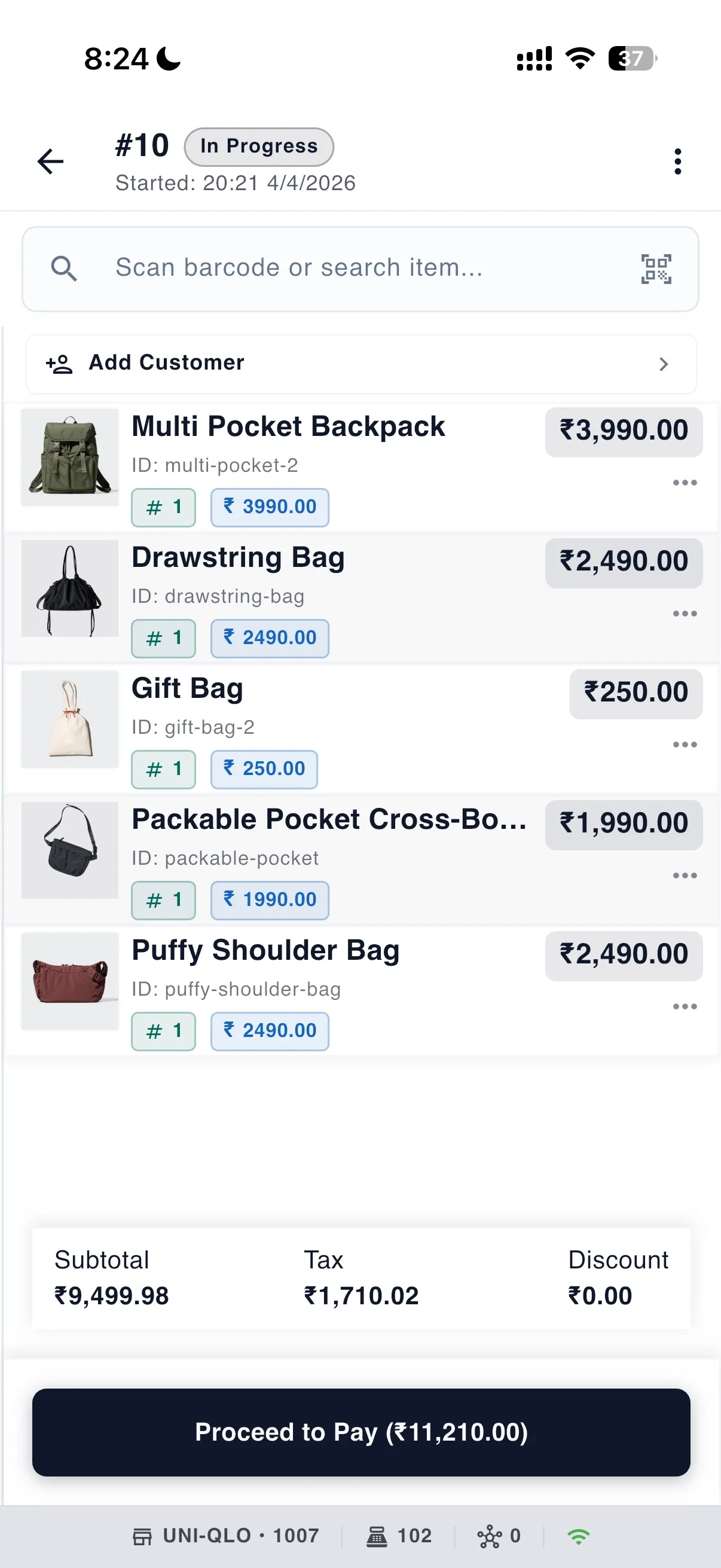
Scan it, tap it or type it. The line lands, the total moves, and the queue keeps moving.
- Scan with the camera, or any USB or Bluetooth scanner
- Variants, add-ons, packs and weighed quantities, prompted at the line
- Discounts by percent or amount, every one with a reason code
More
- Tap-to-add grid with images and category tabs, plus instant search of the on-device catalogue
- Kits that record their component lines
- Smart scan: barcode, then item ID, then a clear not-found. Duplicate barcodes open a chooser.
- Favourites strip pinned by the shop, and an auto-ranked hot items strip
- Quick-add an item that is not in the catalogue yet, mid-sale
- Serial-number capture on serialised goods
- Prompted or open price items, line notes, quantity and price changes gated by permission
- Per-item tax groups, tax-inclusive pricing, VAT and sales-tax modes, cash rounding
- Order type on every sale: eat-in, takeaway or delivery
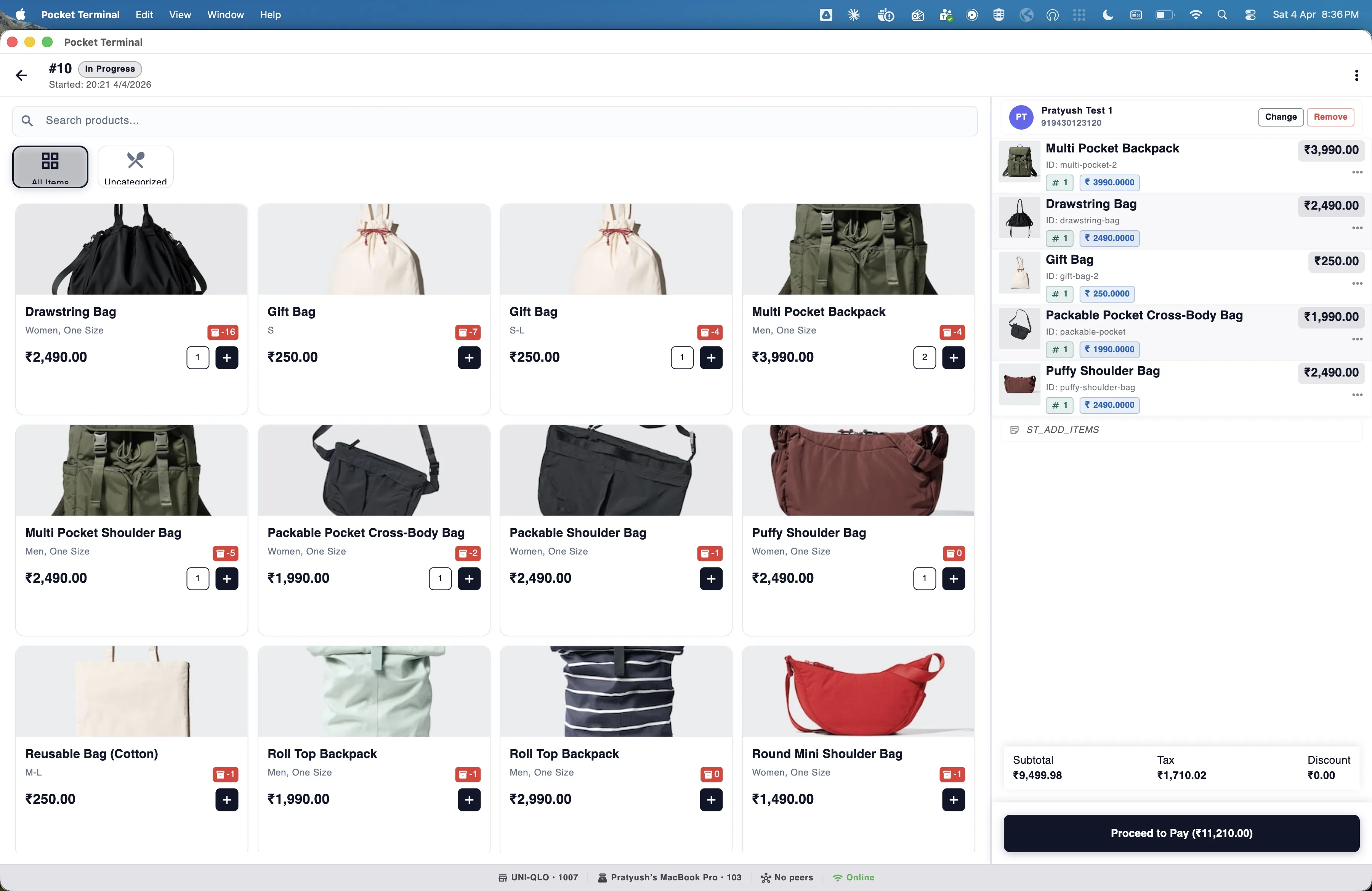
Animation: a scan beam sweeps a barcode, the item pops into the cart, a discount chip lands, the total rolls, the payment splits between Cash and Card, and the balance reaches zero.
02 / 08 Till app
Works offline
Every screen reads from the device. The network only refreshes it. Sales made offline send themselves later.
- The whole till works with no connection, refunds and approvals included
- Sales queue locally and send themselves, deduplicated so nothing double-posts
- An unsent counter in the footer, and a queue you can watch
More
- Catalogue snapshot on first sign-in, then deltas, with a manual resync button
- Offline documents get a TBD- number that is swapped for the real one on sync
- Manager PIN overrides verified on the device
- Full configuration synced to every till: tax, tenders, discounts, reason codes, hardware, settings and roles
- The back office can force every till to re-download its configuration
- Force retry on any queued record
- The first sign-in on a device and the back office need a connection
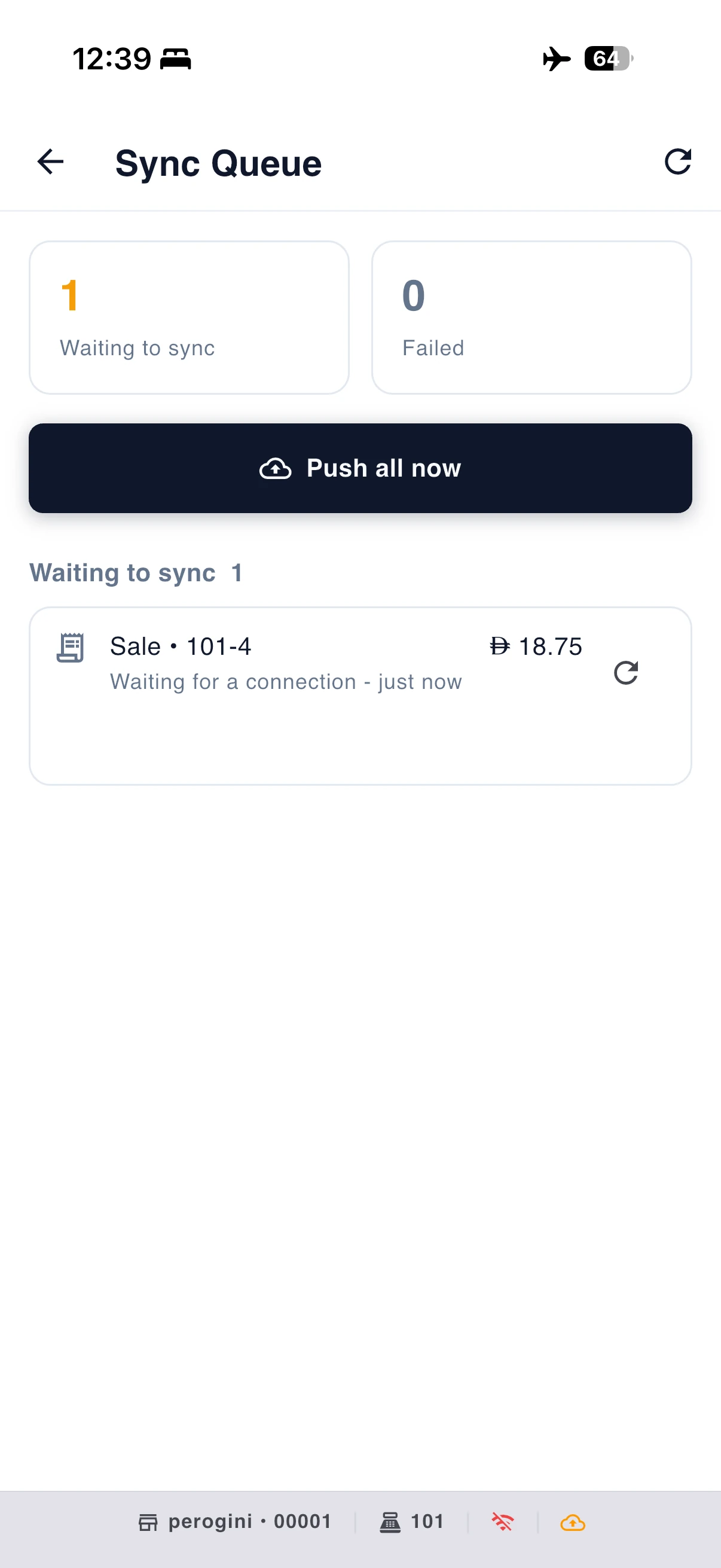
Animation: a large Online pill turns to Offline. Records collect in two lanes, one labelled will send itself and one labelled needs attention. When Online returns, the first lane drains to the cloud and the second waits for a person.
03 / 08 Till app
Payments and paperwork
Take any tender, split it any way, and hand over the right document for your country in the right language.
- Cash, card, UPI or any tender you configure, split any way
- Sell on account against a customer's credit limit
- India GST and UAE VAT document packs, in English and Arabic
More
- Returns against the original sale, refunded to the original tenders, and exchanges in one linked transaction
- Estimates and quotes converted to a sale later with the link kept
- ESC-POS thermal receipts at 58 and 80 mm, and A4 PDF invoices to any system printer
- Share a PDF receipt through the share sheet to WhatsApp, email or AirDrop
- Automatic document choice per country and sale shape, and promote a receipt to a tax invoice on demand
- Server-issued unbroken numbering; reprint any document byte-identical
- Per-role tender rules: minimums, maximums, refund limits, customer required, no split
- Park a sale, void a line or a payment, post-void a completed sale, refund without a receipt
- Cash in and out: float, pickup, drop, loan, paid-in, paid-out, each journalled
- Card is recorded as a tender. There is no integrated card terminal yet.
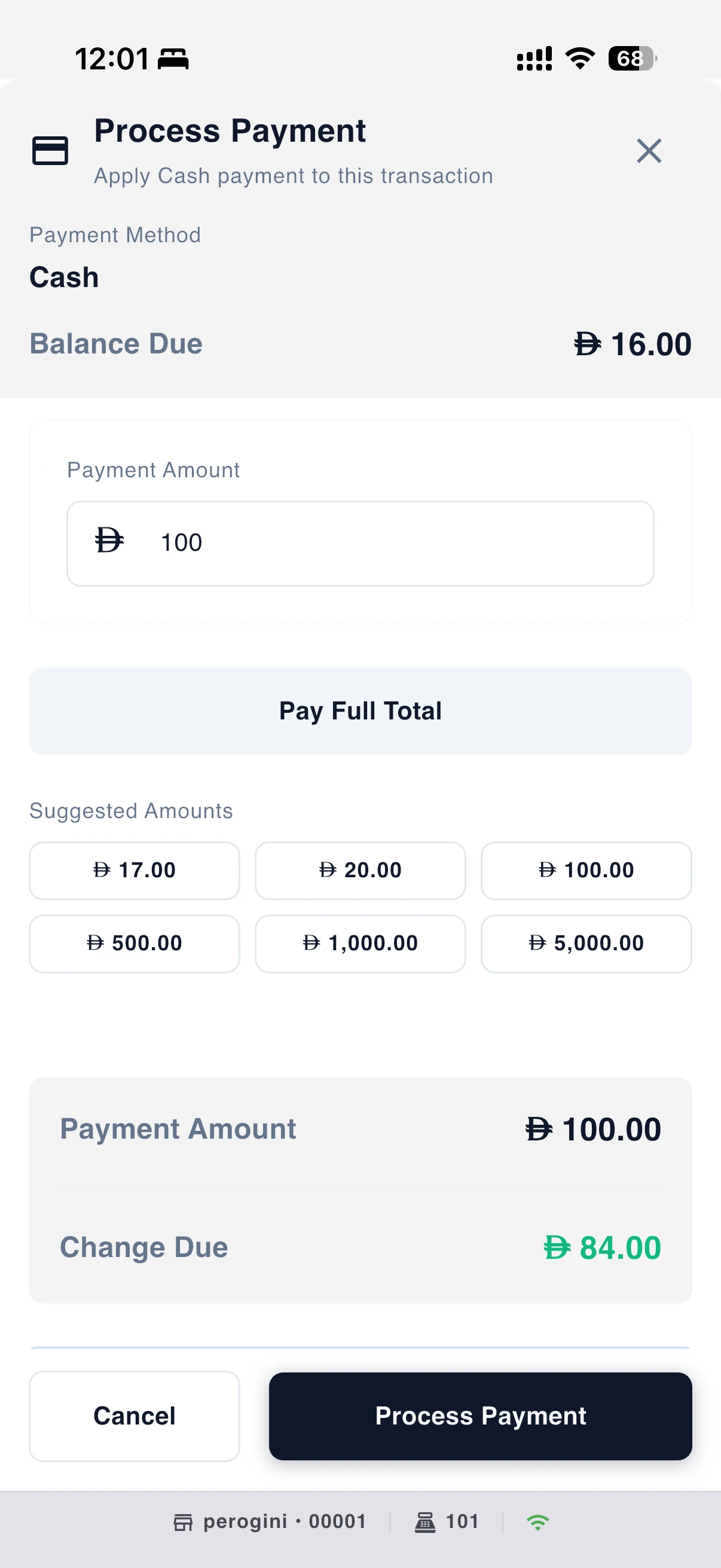
Animation: a thermal receipt prints out of a small printer, then flips to reveal an Arabic tax invoice.
Restaurants and cafés
Built for the floor, not just the counter.
Seat, order, fire, print, pay. The floor plan lives on the till and the kitchen gets a printed ticket per station.
Animation: a floor plan where tables cycle through free, seated, ordered and paid. A check opens, a course fires to a kitchen printer that prints a ticket, two tables merge, and the order type flips between eat-in and takeaway.
- A floor plan with zones, drawn in the back office and live on the till
- Tap a table to seat it, open a check or clear it
- Courses held and fired, with a warning if one is still held at payment
- Kitchen tickets per station, ticket N of M
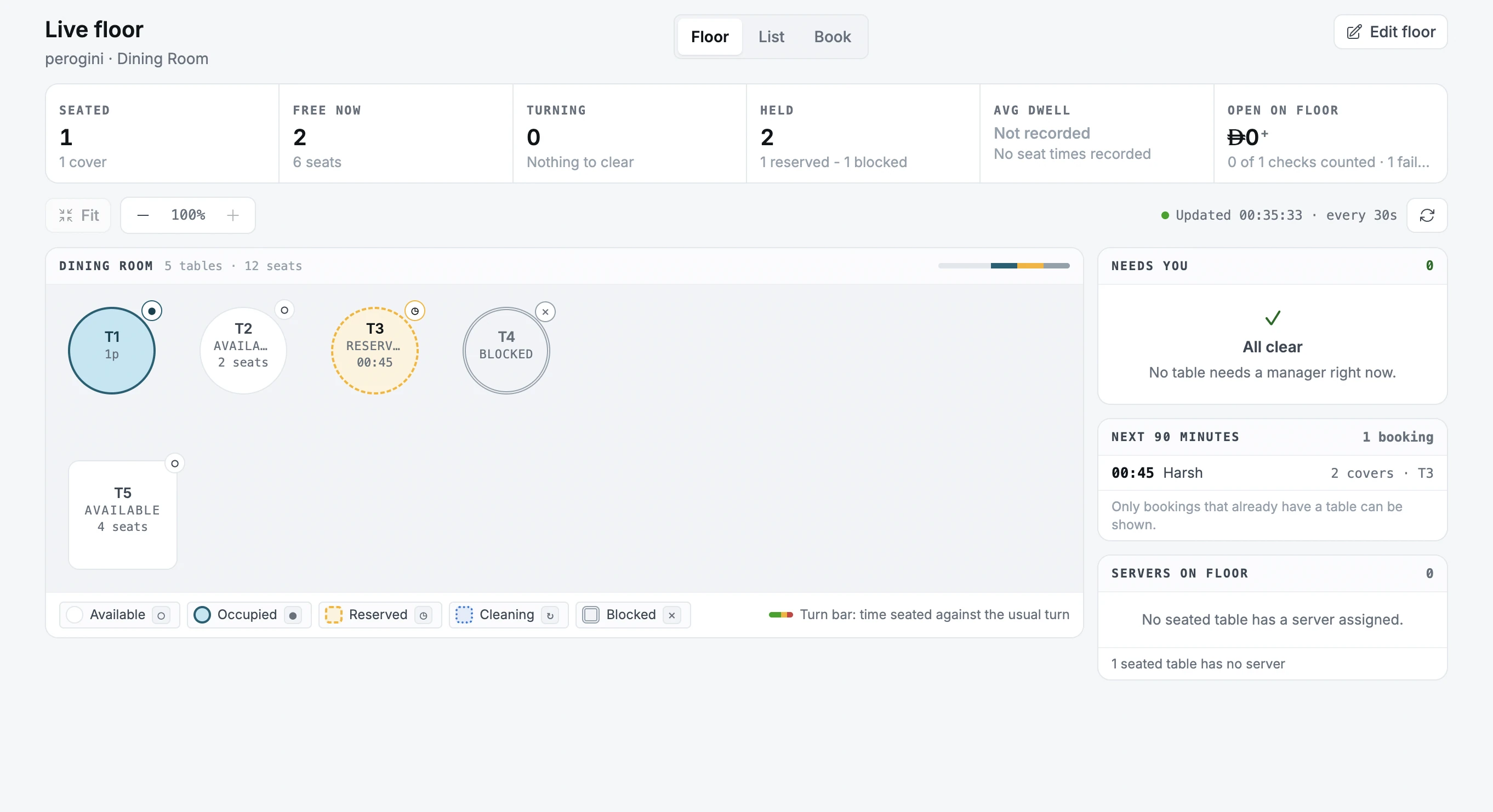
Kitchen output is printed tickets. There is no kitchen display screen. Reservations are created in the back office, not on the till yet.
Part two
In the back office
Catalogue, stock, customers, team and numbers, run from any browser and synced to every till.
04 / 08 Back office Early access
Your catalogue, built in minutes
Upload a menu photo or a spreadsheet, review what was read, approve, and start selling.
- Upload a menu photo or a price list, and approve what it read
- CSV import and a spreadsheet grid for bulk price and tax edits
- Per-shop price and tax overrides, inherited unless you change them
More
- Variants, per-product options and reusable global modifier groups applied in bulk
- Multiple barcodes per product with symbology detection and check-digit validation
- Discounts with limits, exclusivity and expiry, and reason codes with requires comment
- Nothing is saved by the AI import until you press Approve and Commit. Every field shows where it came from and how confident the reading is.
- Hover a field on the review screen and its source region lights up on the document
- Duplicate uploads within seven days are detected. Fuzzy matches are never auto-accepted.
- Nested categories with colours and sort order, and category import from a spreadsheet
- Kits: bundle several products into one sellable item
- Product images resized automatically and served from a CDN
- Create or edit a product on the till without leaving the sales screen
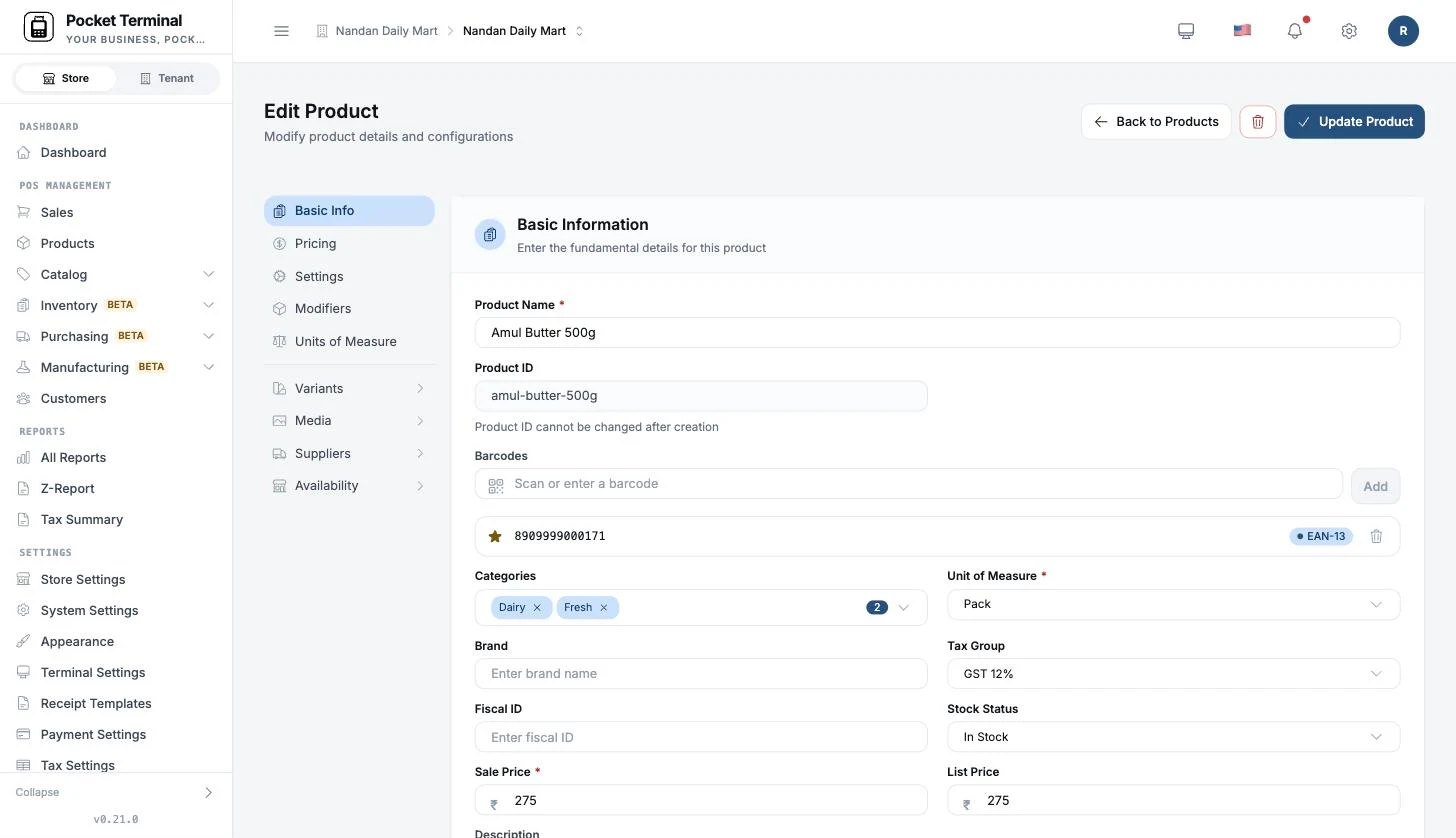
Animation: a menu photo is uploaded, reading boxes trace across it, items line up on the right, one row is hovered and its region on the photo glows, Approve is pressed, and the items land in the catalogue.
05 / 08 Back office Beta
Stock you can trust
Every movement is a ledger line you can trace back to the document that caused it.
- Stock on hand per item per shop, with a last-updated stamp
- Counts that freeze the expected quantity and post only the variance
- Out-of-stock policy per item: block, warn or allow
More
- Append-only movement ledger with per-item history and drill-through to the causing document
- Adjustments: opening balance, restock, return and manual correction, each with a reason
- Low-stock alert email
- Stock valuation
- On the till: opening stock, adjustments, a low-stock badge and a per-item ledger
- Coming soon: purchase orders with maker and checker approval, goods receipts that post stock and update cost
- Coming soon: transfers between shops with an in-transit view and variance reasons
- Coming soon: recipes with batch yield and production orders
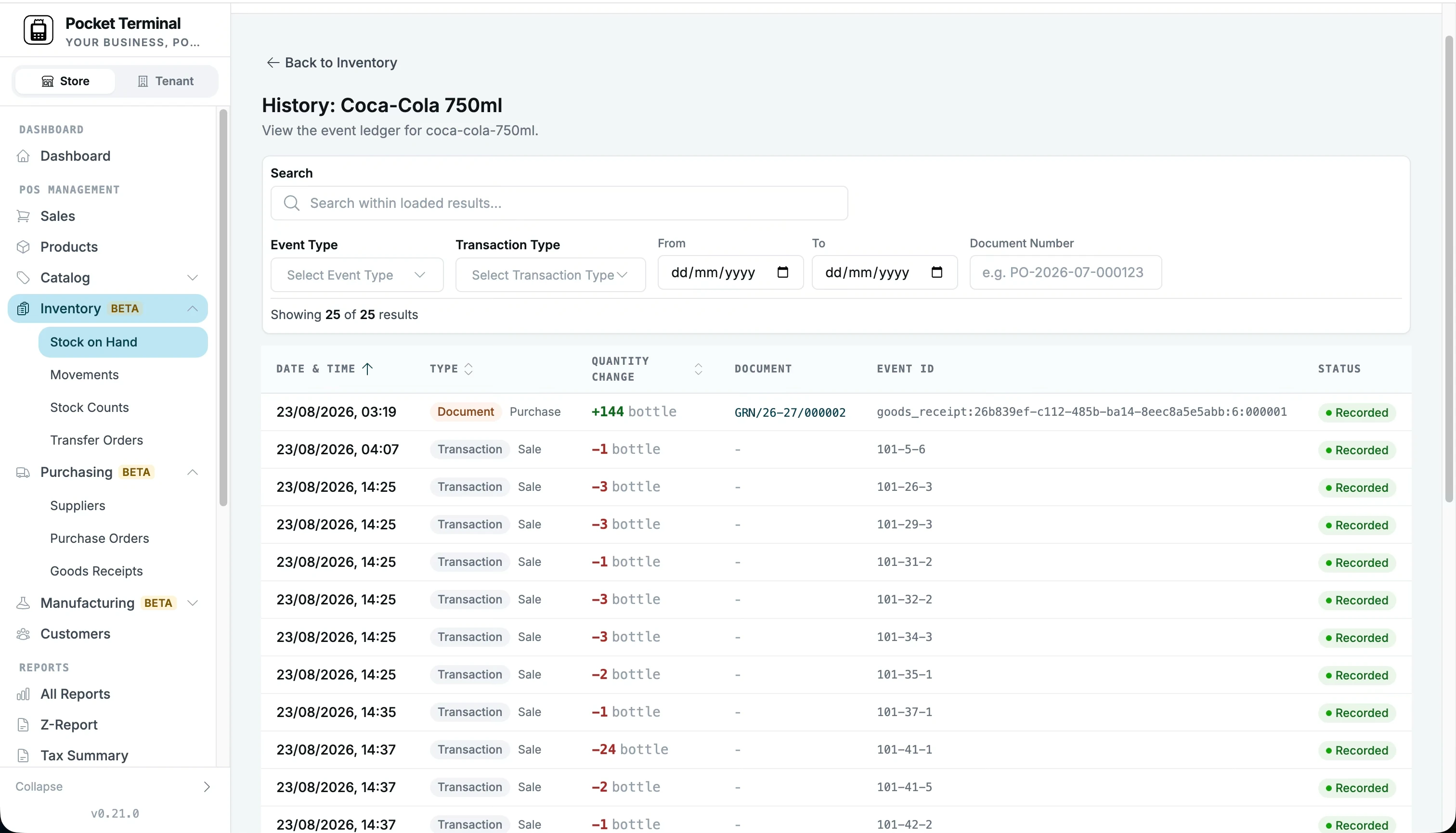
Animation: a stock bar drains as sales happen, a low-stock badge appears, a stock count posts a variance, and a restock adjustment refills the bar. Each step writes a line to the ledger.
06 / 08 Till and back office
Customers and credit
Attach a customer to any sale, let them pay later, and keep the ledger straight on the device.
- Find or add a customer without leaving the queue
- Credit limits and balances computed on the device, fully offline
- PDF statements with ageing buckets, to print or share
More
- Customer records with contact, company, tax ID, address, notes and tags
- Ledger adjustments: write-off, waiver, correction and late fee, each with a reason
- Collect a payment against open invoices, allocated across them, fully offline
- Reverse a payment for a bounced cheque or a cashier error
- Hybrid search: local prefix search offline, server search merged in when online
- Purchase history per customer
- Opening balance migration from a paper ledger
- Purpose-built slips: customer payment receipt, ledger slip, account-credit slip
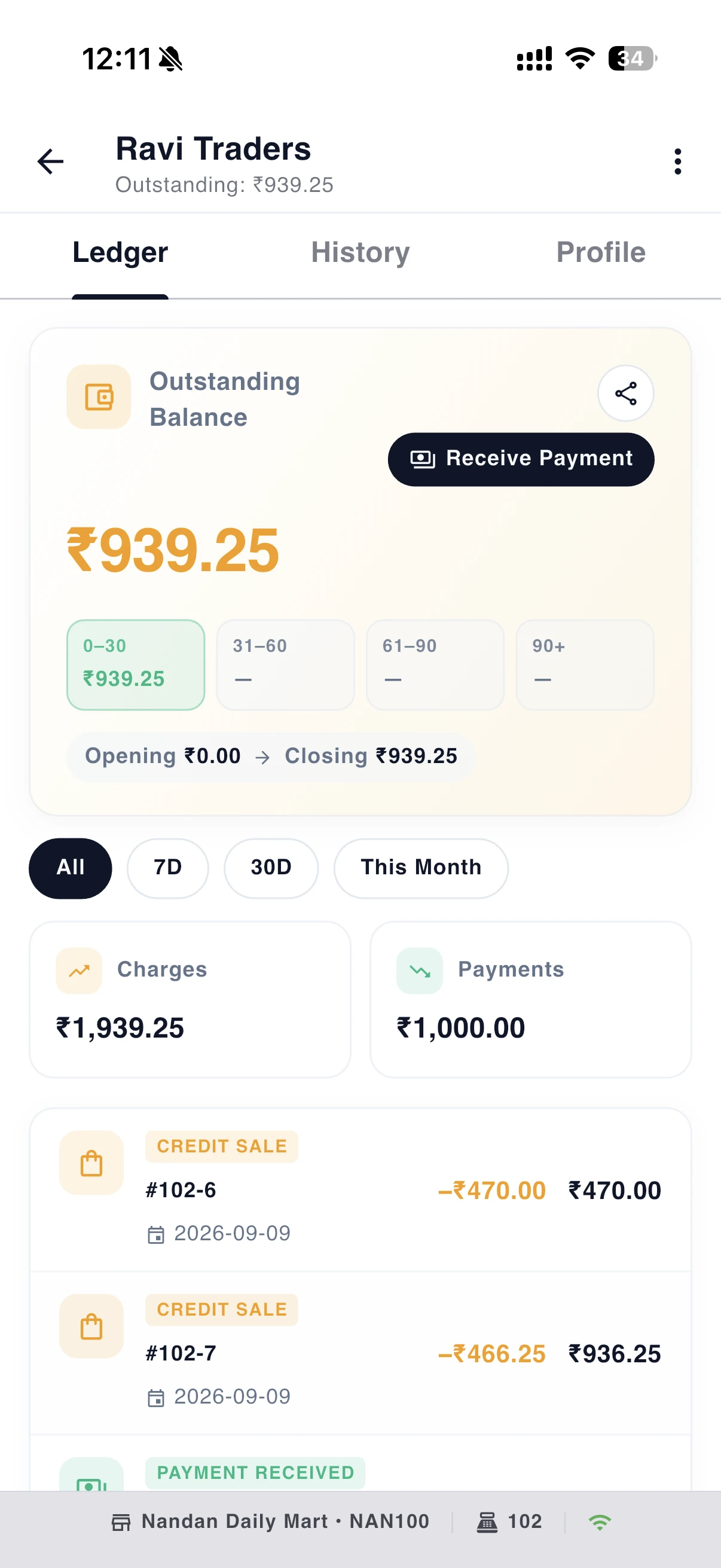
Animation: a customer card attaches to a sale, the sale moves into a ledger as a balance, a payment reduces the balance, and a statement slides out.
07 / 08 Till and back office
Team and control
Give each person exactly what they need, and keep a record of every override.
- 7 built-in roles and 155 permissions, or build your own
- Manager override by PIN, verified offline, approver and reason recorded
- Reason codes forced on voids, discounts and price changes
More
- Per-shop access: a business role, then a shop role per shop
- Operator recorded on every sale, feeding the employee reports
- Open and close the day with a business date, or let the till open and close automatically
- You cannot grant a permission you do not hold yourself
- Permissions are cached on the till and evaluated offline
- Sign in by email, Google or Apple, with forced password change on first sign-in
- Open and close each till; force-close a till or a day left open elsewhere
- Parked or open sales must be settled before the day closes
- Session login and logout journalled per operator
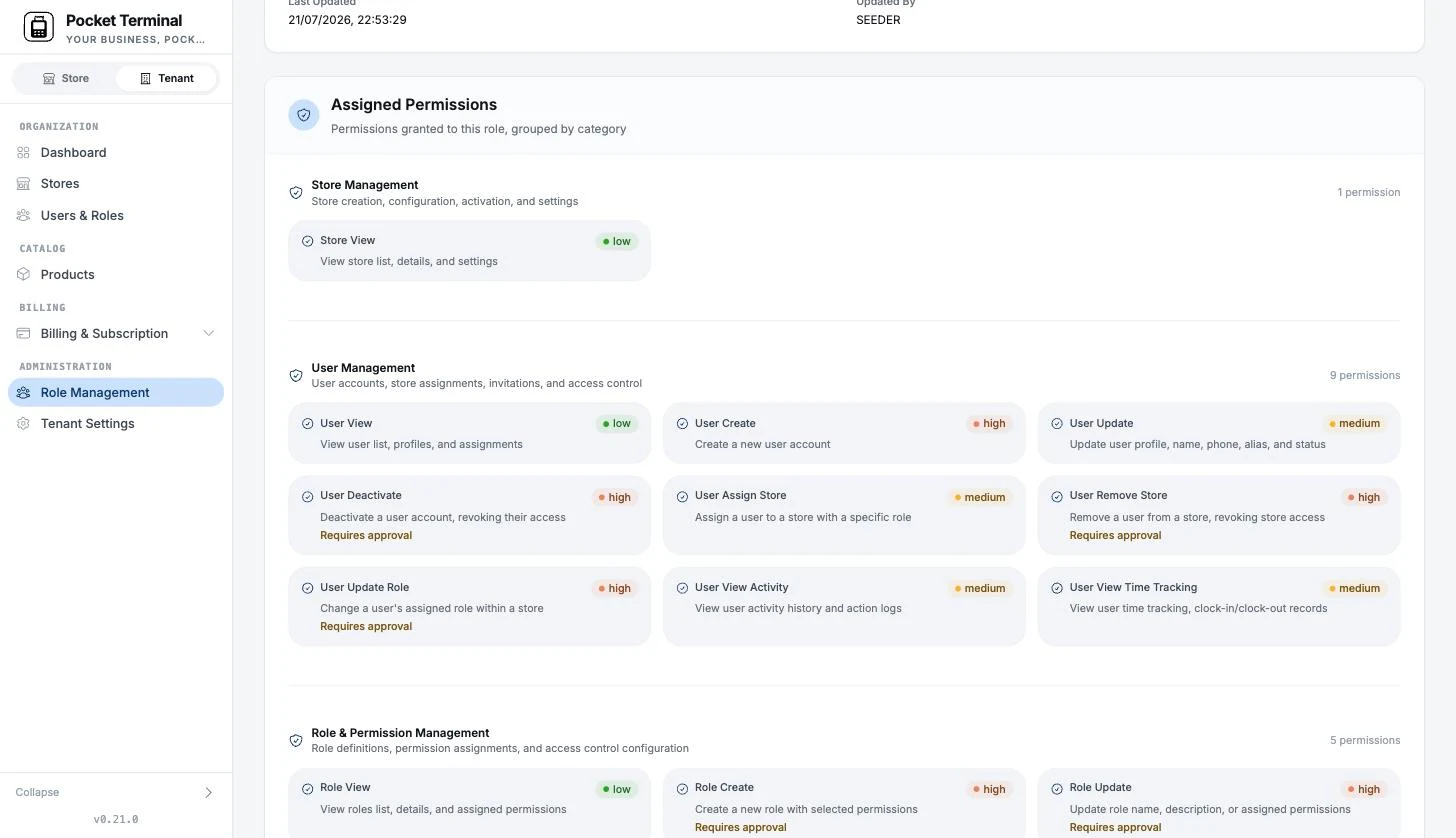
Animation: a role matrix where cells toggle between allow, deny and inherit, then a PIN keypad authorises a price override and an audit line is written.
08 / 08 Till and back office
Know your numbers
Sixteen reports on the device, a dashboard in the back office, and a Z-Report that ties out.
- 16 reports on the device, exported to CSV or PDF
- A dashboard that compares this period with the last
- A Z-Report that ties out, gross to net
More
- Hour-by-weekday heatmap, category and tender mix, and top items
- Cashier performance table, gated by permission
- Shop league: every shop ranked against its own prior period
- Till reports: Sales Summary, Sales by Item, Sales by Category, Hourly Sales, Payment Summary, Tax Report, Discount Report, Voids and Returns, Terminal Report, Customer Statement, Customer Sales and five employee reports
- Period selector: today, week, month, quarter, year or custom, compared with the previous period, previous year, same day last week or trailing 28 days
- Every back-office report exports CSV and prints to PDF
- A daily sales summary email and a low-stock email
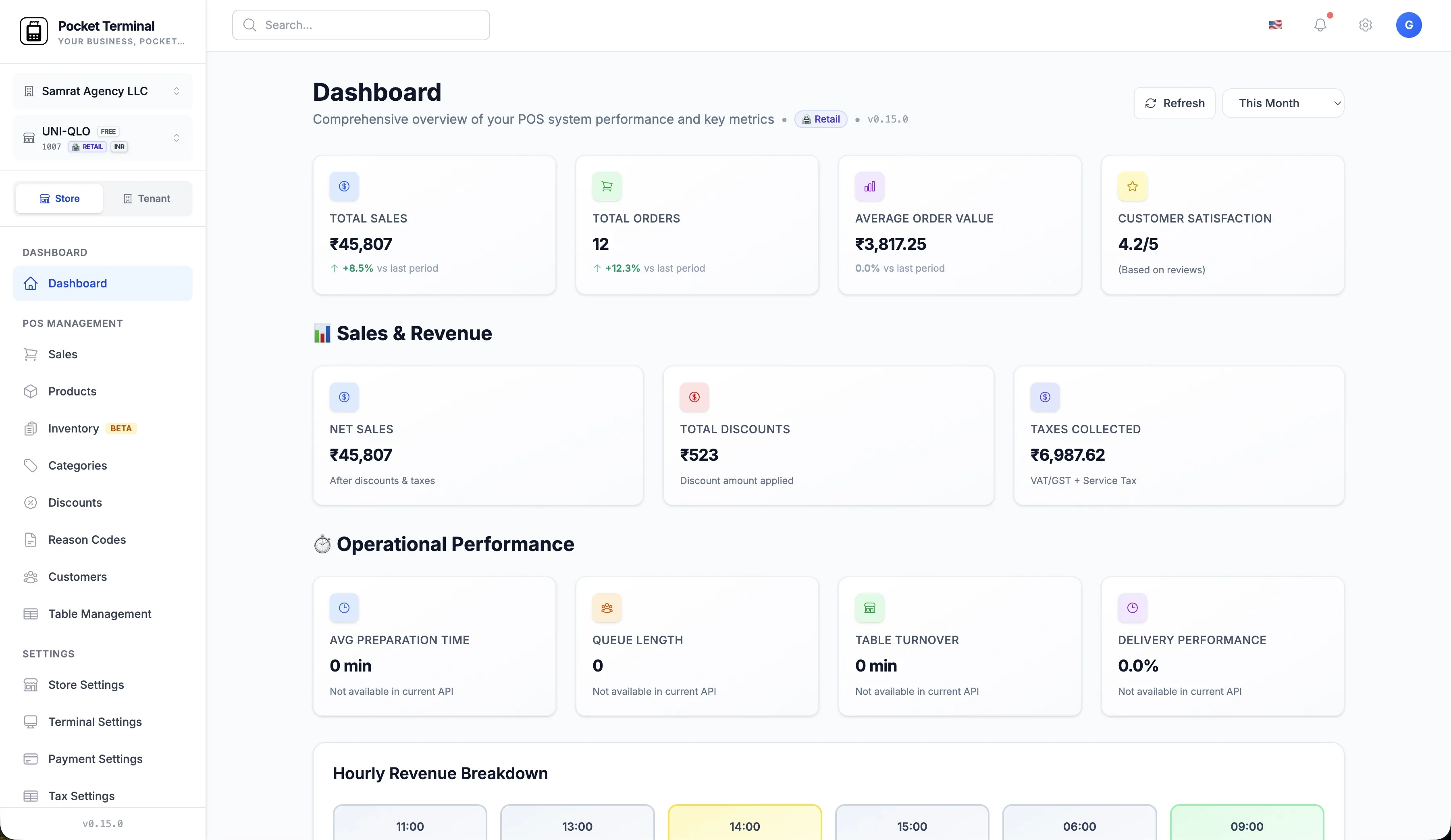
Animation: KPI cards count up, a bar chart draws, a chip flips to compare with the last period, and a shop league reorders.
Built with AI, checked by you Early access
AI does the typing. You keep the final say.
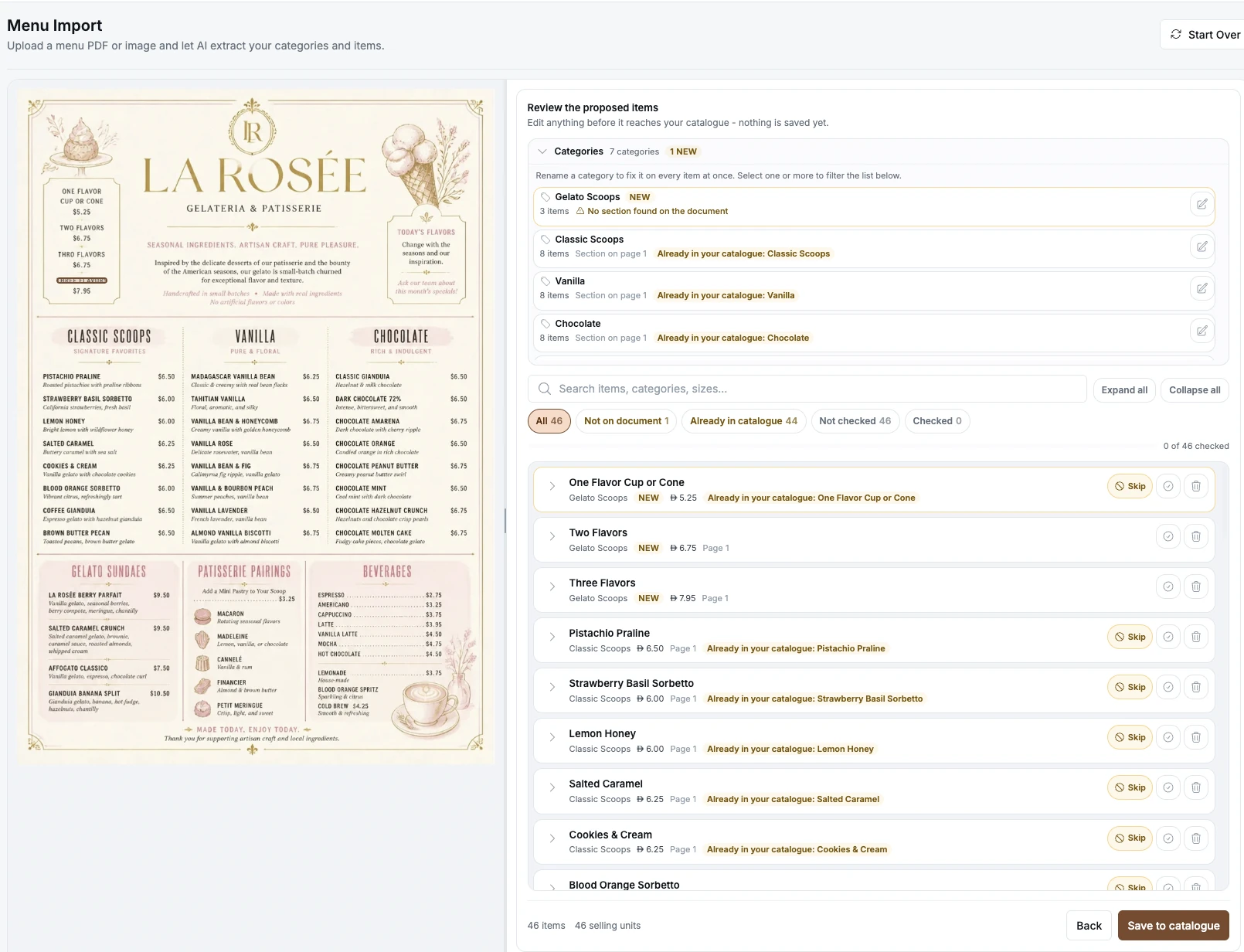
Upload a menu photo or a price list and the import reads it, matches it against your catalogue and shows you every reading beside the document.
Nothing is saved until you approve
The pipeline can read, match and score, but it cannot write. One review at a time, every field editable, every model call logged with its cost.
See how the import worksAnimation: extracted items sit in a review list with confidence labels. A cursor edits one price, rejects one row, then presses Approve and Commit. Only then do the items move into the catalogue.
Why the reading holds up
-
Reads the layout, not just words
A three-column menu arrives as three categories, prices attached.
-
Knows what you already sell
Re-import a menu and it updates your items instead of duplicating them.
-
Admits what it is unsure about
Every line is scored, and a fuzzy match is never accepted on its own.
Everything else
The parts you will be glad are there.
Multi-shop and per-shop plans
One business, many shops. Switch from the top bar, open a new shop from the back office or the till, and put each shop on Starter or Pro.
Hardware you already own
Bluetooth, Wi-Fi and USB receipt printers, a cash drawer through the printer, label printers, and any camera, USB or Bluetooth scanner. Add, test and enable each from the till.
Languages and currencies
Back office in English, Spanish, Hindi, Arabic, German and Slovak with full RTL. Till in English and Arabic. Around 30 currency formats, including 3-decimal Gulf currencies, with exact decimal money.
Every platform you run on
Till app on iPhone, iPad, and Android phone and tablet, with separate phone and tablet layouts. Back office in any modern browser, down to phone width. macOS and Windows are on the way.
Security and isolation
Every business is isolated: every API call validates the business before any logic runs. Sign in with email, Google or Apple. Serverless on AWS.
Help centre and onboarding
Describe your shop in one line and the setup assistant proposes the name, type, country and tax defaults, or fill in the form. A help centre for every screen.
How it works
Selling by this afternoon.
- 1
Start the trial
Sign up at admin.pocketterminal.com. Fifteen days free on either plan, no card needed.
- 2
Set up your shop in the back office
Describe the shop or fill in the form, then add products by hand, import a spreadsheet, or import a menu photo.
- 3
Install the till app and register the device
Install on iPhone, iPad or Android, sign in once, and the till takes a number and downloads the catalogue.
- 4
Open the day and sell
Open the day, ring up the first sale, print the receipt. From here on, the connection is optional.
Pricing
Per shop. Mix and match.
Every shop is billed on its own. Keep a small shop on Starter and the busy one on Pro, and change any shop at any time.
Starter
€29 per shop / month
Solo shop, kiosk, market stall or side business.
Start free trial15 days free. No card needed.
What each shop gets
- 3 devices per shop
- 3 user accounts
- 500 products
- 10 AI document pages a month
- Priority support
Pro
€49 per shop / month
Busy shop, more devices, unlimited products, ten times the AI pages.
Start free trial15 days free. No card needed.
What each shop gets
- 10 devices per shop
- 10 user accounts
- Unlimited products
- 100 AI document pages a month
- Priority support
Work out your monthly bill
Monthly total
1 × Starter €29
€29/ month
Mix and match: each shop is billed on its own tier and can change at any time.
Your first 15 days are free on either plan. Excludes VAT.
Both plans include
- Works fully offline with cloud sync
- PDF receipts and invoices, shared to WhatsApp or email
- Multi-shop back office with per-shop plans
- Restaurant floor plan and kitchen tickets
- Unlimited sales and customers
Coming to Pro
- Planned Customer CRM
- Planned Vouchers and gift vouchers
- Planned Automatic deals at the till
15-day free trial on either plan with 5 AI document pages, no card needed. If you do not add a card, your shops pause and your data waits for you. Prices exclude VAT. Upgrades apply immediately, downgrades at the end of the period.
AI document pages are the pages of menus and price lists the import reads for you. Starter includes 10 a month, Pro 100, and the trial 5. When a shop reaches its pages, imports wait until next month or an upgrade.
Need API access or more than 10 devices per shop? Write to us. hello@pocketterminal.com
FAQ
Questions shop owners ask.
Working offline and devices
Does it really work offline?
Yes. Every screen on the till reads from the local database. Sales, payments, returns, receipts and manager approvals all work with no connection, and each record is queued and sent when the connection returns. Only the first sign-in on a device and the back office need a connection.
Do I need to buy new hardware?
No. The till runs on the iPhone, iPad or Android phone or tablet you already own. Scan with the camera, or plug in any USB or Bluetooth scanner. Receipt printers connect over Bluetooth, Wi-Fi or USB.
Does it run on a Mac or a PC?
Not yet. macOS and Windows builds are coming. Today the till runs on iPhone, iPad and Android, and the back office runs in any modern browser on a Mac or a PC.
Which languages does it support?
The back office is available in English, Spanish, Hindi, Arabic, German and Slovak, with full right-to-left layout. The till is available in English and Arabic, including Arabic thermal receipt templates.
Restaurants and AI
Can I import my menu from a photo?
Yes. In the back office, choose AI Import and upload a menu or price list as a PDF or photo up to 20 MB. A review screen shows the document beside the items it read, with every field marked by confidence and source. Nothing is saved until you press Approve and Commit. This feature is in early access.
What does Beta mean?
Beta features are shipped and work on real data, but the product still labels them Beta while they gather feedback. Stock on Hand, the movement ledger and stock counts are Beta today.
Does it support restaurants?
Yes. Restaurant shops get a floor plan with zones, live table status, merged tables, server assignment, bookings, courses with hold and fire, and kitchen tickets printed per station. Kitchen output is printed, there is no kitchen display screen.
What are AI document pages?
Every menu or price list you import is read page by page. Starter includes 10 pages a shop a month, Pro includes 100, and the free trial includes 5. A typical menu is one to five pages. AI import is in early access.
Pricing and billing
Can I try it before paying?
Yes. Every new account gets 15 days free on the plan you pick for each shop, up to two shops during the trial, and no card is needed. Switch a shop between Starter and Pro at any time. If you do not add a card by the end, your shops pause and your data waits for you until you do.
Can I mix Starter and Pro shops?
Yes. Every shop is billed on its own. Pay €29 a month for shops on Starter and €49 a month for shops on Pro. Upgrade a shop immediately, or downgrade it at the end of the period.
What happens when I hit a limit?
Starter shops can register 3 devices, hold 500 products and have 3 user accounts; Pro shops can register 10 devices, hold unlimited products and have 10 user accounts. Adding a device or a user past the limit is blocked until you remove one or upgrade the shop. AI document pages reset every month; when a shop has used its pages, imports wait until next month or an upgrade.
What if I downgrade from Pro to Starter with more than 500 products?
The downgrade is refused until the shop is within Starter limits. Delete the extra products or remove extra devices first, then downgrade at the end of the period.
What currency is pricing in, and is VAT included?
Prices are in euros and exclude VAT. Your shop sells in its own currency, with around 30 currency formats supported.
Shops, payments and security
Do you integrate with card terminals?
Not yet. Card is recorded as a tender on the sale, and you take the payment on your existing terminal. There is no integrated card terminal or acquiring at the moment.
Can I manage multiple shops?
Yes. One business can hold many shops. Switch between them from the top bar, see the whole business in one view, and put each shop on Starter or Pro.
Is my data secure?
Every business is isolated. Every API call validates the business before any logic runs, and search indexes are derived from the validated business, never from the request. Sign-in uses AWS Cognito with email, Google and Apple.
What payment methods are supported?
Cash, card, UPI, RuPay, wallets and any tender you configure, with split and partial payments, sale on account and per-role tender rules.
Is API access available?
Not on Starter or Pro. API access is planned for a future Enterprise tier. Write to us if you need an integration now.
Open your till today.
Install on the devices you already own.
- 15-day free trial
- No credit card
- Cancel any time
Questions? Write to hello@pocketterminal.com